

When a user clicks a link on your site, every millisecond spent waiting for the server to return HTML costs you engagement, bounce rates, and mobile conversions.
For years, performance tools attempted to solve this with standard <link rel="prerender"> or <link rel="prefetch"> tags, or heavy JavaScript preloading libraries that trigger background HTTP requests whenever a user’s mouse touches a link.
While better than nothing, standard JS-based preloading often introduces server CPU spikes, wastes mobile bandwidth on speculative clicks that never happen, and still relies on standard browser fetch chains.
Enter Speculation Rules API: the modern, browser-native API that allows OptiWave to deliver true 0ms instant page navigation in WordPress.
Table of Contents
What is the Speculation Rules API?
The Speculation Rules API is a modern browser standard natively implemented in Chromium engines. Unlike older prefetching methods, it allows developers to pass a structured JSON configuration to the browser indicating which URLs should be speculatively fetched or full-rendered in the background before the user even completes a click.
- Zero Main-Thread JS Overhead: No third-party JavaScript event listeners need to be parsed, compiled, or executed on the main thread to handle link hovering, protecting your Interaction to Next Paint (INP) score.
- Adaptive Engine Management: The browser automatically cancels or throttles speculative prerendering if the user’s mobile device is in Data Saver mode, on a weak CPU, or low battery.
- Full Prerendering vs. Simple Prefetching: Simple prefetching only downloads the raw HTML payload into disk cache. Speculative prerendering goes a step further: it renders the entire invisible DOM page (including CSS and layout) in an isolated background browser tab context. When the user clicks, the pre-rendered tab instantly swaps into view in 0 milliseconds.
Standard Link Hovering vs. Modern Speculation Rules
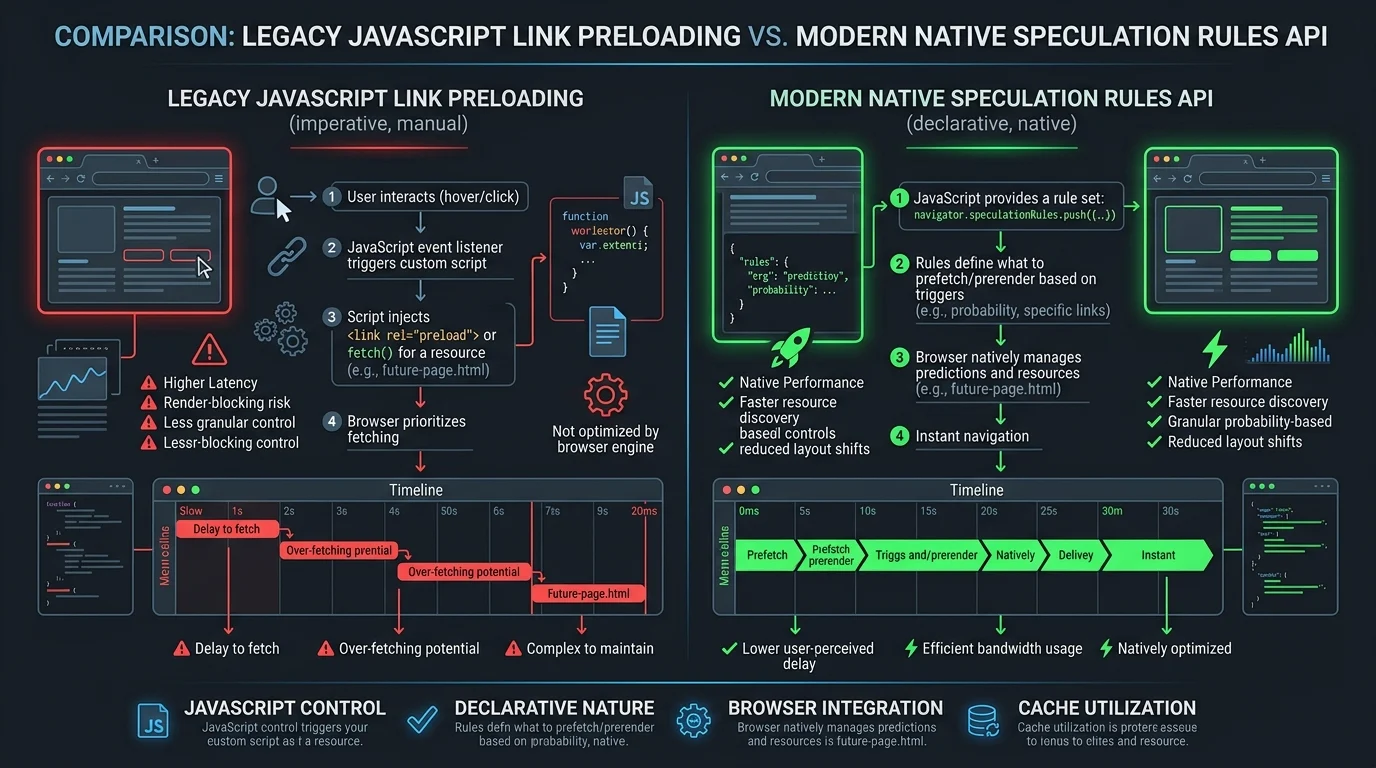
Here is how legacy JavaScript preloading compares to browser-native Speculation Rules:
| Feature / Metric | Legacy JS Link Preloaders | OptiWave Speculation Rules API |
|---|---|---|
| Execution Engine | Main-thread JavaScript execution | Native Browser Engine (Chromium) |
| Main Thread Impact | Adds JS overhead on every hover event | 0ms main thread blocking (INP friendly) |
| Resource Efficiency | Downloads blindly on hover, CPU heavy | Auto-throttled based on battery / network |
| Navigation Latency | ~150ms – 300ms (HTML fetch time) | 0ms (Instant tab swap) |
| Mobile Data Saver Compliance | Ignores native browser data settings | Respects client Save-Data headers |
How OptiWave Implements Speculation Rules for WordPress
In OptiWave v1.3.0, enabling Instant Navigation takes a single click under File Optimization ➔ HTML & General Optimizations.
The Underlying Mechanism
When Instant Navigation is enabled, OptiWave dynamically injects an optimized <script type="speculationrules"> JSON payload into the page <head> during static HTML generation:
{
  "prerender": [
    {
      "source": "document",
      "where": {
        "and": [
          { "href_matches": "/*" },
          { "not": { "href_matches": ["/cart/*", "/checkout/*", "/my-account/*", "/*?*"] } },
          { "not": { "selector_matches": ".no-prerender, .logout-link" } }
        ]
      },
      "eagerness": "moderate"
    }
  ]
}
Key Technical Highlights of OptiWave Rule Engine
- Eagerness Calibration (
moderate): OptiWave configures speculative prerendering with amoderateeagerness threshold. Prerendering triggers only when the user hovers over a link for 200ms or begins a touch-start gesture, eliminating accidental bandwidth waste. - Automated E-Commerce Safety Exclusions: OptiWave automatically excludes dynamic WooCommerce endpoints like
/cart/*,/checkout/*, and logout links from speculative prerendering to prevent false cart additions or accidental session mutations. - Layer 1 Synergy: Because OptiWave serves static HTML from disk via Layer 1 server rewrite rules, speculative requests return pre-compressed Brotli/Gzip static files in 1ms, ensuring near-zero server load even when multiple links are pre-fetched simultaneously.
Practical Setup in OptiWave
- Navigate to OptiWave Menu ➔ File Optimization.
- Locate Instant Navigation in Column 1 (HTML & General Optimizations).
- Toggle Instant Navigation to ON.
- Save settings and purge cache.
Visitors on modern browsers will immediately experience sub-millisecond, instant transitions between your site’s posts and pages, dramatically lowering bounce rates and improving engagement metrics across the board.
Does Speculation Rules API work on all mobile devices and browsers?
The Speculation Rules API is natively supported by Chromium-based browsers (Google Chrome, Microsoft Edge, Opera, Brave) across mobile and desktop devices. For non-supported browsers, OptiWave safely falls back to standard fast caching rules without breaking page functionality.
Will Speculation Rules API overload my WordPress server?
No. Because OptiWave uses a moderate eagerness threshold, prerendering only triggers on high-intent hover or touch gestures. Furthermore, OptiWave serves cached static HTML via Layer 1 server rewrite rules in 1ms, resulting in negligible server load.
Is Speculation Rules API safe for WooCommerce checkout pages?
Yes. OptiWave automatically excludes WooCommerce cart, checkout, my-account, and dynamic session URLs from speculation rules to ensure dynamic cart items and payment sessions are never falsely pre-cached or altered.