

In the world of WordPress speed optimization, caching is the ultimate tool. However, developer discussions often confuse two distinct caching layers: Page Caching and Object Caching. While both aim to improve loading speed, they operate on different levels of your application stack. Understanding how they work, where they store data, and how to combine them is essential to achieving under-second Core Web Vitals scores without overloading your server.
Table of Contents
Understanding Page Caching: The Static Snapshot
Page Caching takes a snapshot of the fully rendered HTML of a webpage and stores it as a static file (either on disk or in memory). When a guest visitor requests that page, the server returns the static HTML immediately. This completely bypasses the need to run PHP scripts, execute theme files, or query the database.
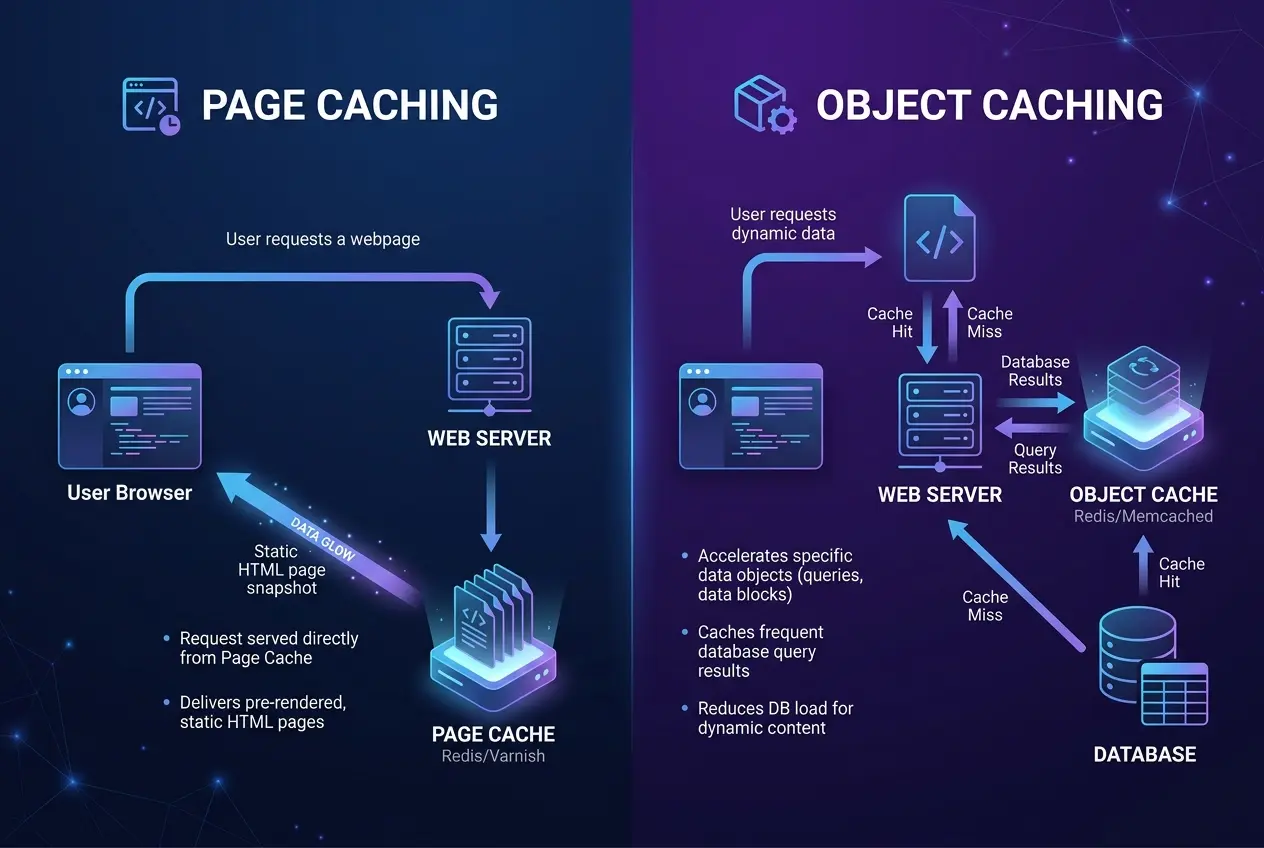
Page caching is highly effective because it reduces server CPU load to virtually zero for static visits. However, it is fundamentally restricted to static, unchanging pages. It cannot be served directly to logged-in users, WooCommerce cart pages, checkout portals, or any request that requires dynamic, personalized processing.
Understanding Object Caching: The Database Accelerator
Unlike page caching, which saves the entire HTML output, Object Caching works behind the scenes at the PHP and database level. It stores individual PHP objects and database query results in a high-speed memory cache (such as Redis or Memcached). When WordPress requires metadata, options, or user credentials, it checks the object cache first before making a slow query to the MySQL database.
This speeds up dynamic operations significantly, making WooCommerce checkout queues, search forms, and custom user portals load much faster. However, because PHP still has to compile the page elements and build the final HTML layout, object caching alone cannot match the sub-millisecond response speeds of static page caches.
Key Differences: Page Caching vs. Object Caching
To understand how these caching mechanisms compare, let us look at their core functional attributes:
| Feature | Page Caching | Object Caching |
|---|---|---|
| Storage Level | Frontend (HTTP / Server Disk) | Backend (PHP / RAM Cache) |
| Target Data | Full HTML Document | SQL Query Results & PHP Objects |
| Execution Bypass | Bypasses PHP and MySQL entirely | Bypasses MySQL database queries |
| Dynamic Support | No (Disabled for dynamic pages) | Yes (Speeds up dynamic requests) |
| Speed Impact | Extremely Fast (TTFB < 55ms) | Moderate (Reduces query execution overhead) |
Why You Need a Hybrid Caching Stack
To achieve peak performance, you should not choose between page caching and object caching; you need both. A hybrid caching stack ensures that static visitors get served instant HTML snapshots, while dynamic users (like WooCommerce shoppers and admin managers) benefit from a Redis-accelerated backend. High-traffic portals should store session transients in Redis memory rather than writing rows to the option table, shielding MySQL from locking up.

OptiWave coordinates these caching layers automatically. When settings are updated or a post is modified, OptiWave handles cache invalidation gracefully. It purges the static page files and triggers rechecks without causing database locks or server overhead, ensuring your site speed remains consistent and your layouts stay intact. Ready to see the performance difference? Explore OptiWave plans →
Does page caching replace the need for Redis or Memcached?
Page caching serves static requests instantly, while object caching (like Redis) accelerates database requests for dynamic or logged-in users.
Can I use both page caching and object caching simultaneously?
Yes, they complement each other. Static visitors get page cache, while dynamic visitors and background processes (like wp-cron) benefit from object caching.