

This guide is part of our in-depth performance engineering series on WordPress speed optimization. For the complete high-level architecture, start with our foundational 3-step framework.
If you’ve ever spent an entire evening toggling settings in three different caching plugins only to watch Google PageSpeed Insights still flag “reduce initial server response time” in bright red, you aren’t alone. It’s frustrating. Stacking more optimization plugins won’t fix it. And in practice, chaining five separate optimization tools usually makes your response times worse.
To reduce initial server response time in WordPress below 100 milliseconds, you must eliminate PHP execution entirely for cached pages. Time to First Byte (TTFB) measures the duration from when a browser requests a page to the arrival of the very first byte of response data. In standard WordPress setups, every request boots the PHP runtime, queries MySQL, and loads dozens of active plugins. Traditional caching plugins speed this up by using a PHP drop-in (advanced-cache.php), but they still consume 30ms to 80ms of PHP processor overhead on every hit. The real solution is Layer 1 server rewrites in Apache, Nginx, or LiteSpeed. By matching requests directly at the web server level and serving pre-compressed static HTML files from NVMe storage before PHP even initializes, origin TTFB drops to 1ms to 5ms, solving the bottleneck at the bare-metal level.
Having studied systems information at university, I’ve always looked at web performance from the bare metal up. Across more than 3,000 custom web platforms, Laravel enterprise backends, high-concurrency Node.js event loops, and WordPress deployments we’ve engineered at our development company since 2015, slow TTFB is rarely an unsolvable mystery. But it’s almost always a mismatch between how dynamic WordPress thinks it needs to be and how static your content actually is. Let’s look at the exact physics of what’s happening under the hood.
Table of Contents
1. Google TTFB Thresholds and Impact on Core Web Vitals
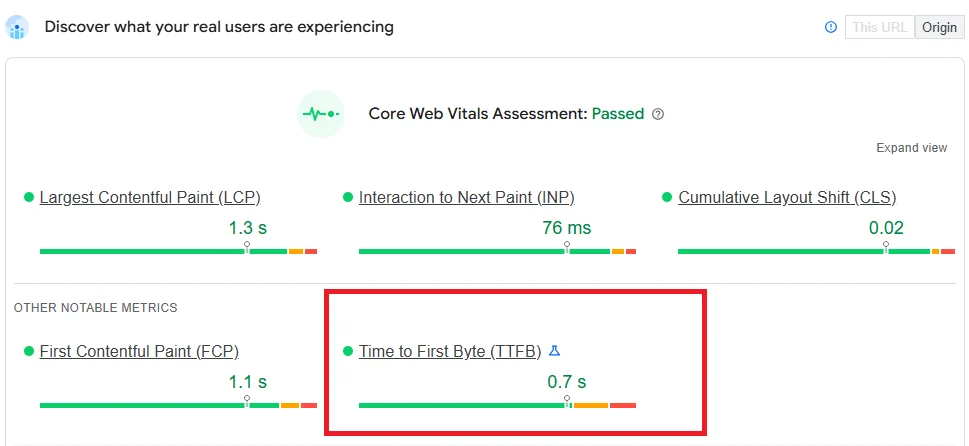
Google defines a good Time to First Byte (TTFB) as 800 milliseconds or less at the 75th percentile of mobile and desktop visits in Chrome User Experience Report (CrUX) data. When server response time exceeds 1,800 milliseconds, Google classifies page health as poor, dragging down search visibility and Core Web Vitals rankings across the board. You can verify these official parameters directly in the web.dev TTFB documentation.
Here’s why TTFB matters far more than most site owners realize: it sets the absolute mathematical floor for your entire page load timeline. Every single millisecond your browser spends waiting for the server to send that first byte is dead time where the browser cannot discover critical resources, cannot parse HTML tags, cannot request hero images for Largest Contentful Paint (LCP), and cannot initiate CSS downloads to eliminate render-blocking resources. Speed matters. If your initial server response takes 1.2 seconds, you cannot achieve a 1.5-second LCP even with perfect image compression.
- Good (Passing): Under 800ms in field data (under 150ms on origin, under 50ms at CDN edge).
- Needs Improvement: Between 800ms and 1,800ms. Browsers stall, increasing bounce rates on mobile networks.
- Poor (Failing): Over 1,800ms. Mobile visitors abandon the session before initial paint occurs.
Measure your server baseline: Before configuring server-level rewrite rules, test your origin response latency from multiple global edge locations using the free OptiWave TTFB Checker. Enter your URL to inspect your real-time DNS lookup, TLS handshake, and initial byte delivery times.
2. The Hardware Baseline: What Optimization Plugins Cannot Fix
Before blaming your WordPress configuration, you have to establish a hard hardware baseline. No caching plugin on earth can overcome a server that’s starved for single-core CPU frequency or throttled on disk I/O. When budget shared hosts market “unlimited storage and 10 CPU cores”, they’re usually selling low-clock multi-core virtual machines where single-thread execution is agonizingly slow.
Because PHP executes synchronous code on a single thread per HTTP request, your raw execution speed depends almost entirely on single-core CPU clock frequency rather than total core count. An enterprise AMD EPYC processor clocked at 3.8GHz will execute WordPress core bootstrap files three times faster than an oversold 2.0GHz virtual core. And if your hosting provider throttles random 4K NVMe read operations or restricts PHP-FPM process memory below 128MB, MySQL queries and autoload lookups will stall before caching logic even evaluates. That’s pure physics. No software can bypass hardware starvation.
Before tweaking WordPress settings, run a simple diagnostic test: upload a plain 10-byte static text file (e.g. https://yourdomain.com/test.txt) and measure its response time in Chrome DevTools. If fetching a static text file takes 300ms, your problem isn’t WordPress. It’s your host’s network routing, TLS handshake overhead, or physical geographic distance.
3. What Causes High Initial Server Response Time in WordPress?
When a request hits an uncached WordPress installation, the server doesn’t just hand over a file. It executes a complex sequence of physical operations across PHP and MySQL:
- 1. DNS Lookup and TLS Handshake: The client resolves your domain name and negotiates TLS cryptographic keys (often adding 50ms to 120ms on unoptimized origins).
- 2. Web Server Socket Connection: Nginx or Apache receives the HTTP/2 or HTTP/3 stream and forwards it via FastCGI socket to the PHP-FPM worker pool.
- 3. PHP Core and Plugin Boot: PHP reads
wp-config.php, loads WordPress core, boots active plugins, parses theme functions, and registers hooks into memory. - 4. MySQL Autoload Queries: WordPress executes
SELECT * FROM wp_options WHERE autoload = 'yes'. If this table has grown to several megabytes from abandoned plugins, reading it adds 150ms to 400ms alone. - 5. Template Rendering & Buffer Output: PHP compiles HTML blocks, evaluates conditional shortcodes, flushes the output buffer, and sends the first response header.
On an unoptimized site with 30 active plugins, this chain routinely takes 1,200ms to 2,500ms. But when multiple visitors arrive simultaneously on a shared host with 2 PHP workers, requests queue up in the backlog, spiking server response time into multiple seconds. That’s why un-cached page delivery fails under pressure.
4. The Architecture: PHP Drop-Ins vs Layer 1 Server Rewrites
Most site owners believe that installing any popular caching plugin instantly fixes TTFB. That’s a dangerous misconception. Almost all standard plugins rely on Layer 2 caching: the wp-content/advanced-cache.php drop-in.
In a Layer 2 drop-in setup, when a visitor requests a page, Apache or Nginx still hands the connection over to PHP-FPM. PHP starts up, opens advanced-cache.php, verifies whether the URL exists in a local cache directory, and echoes the cached HTML file. While this bypasses MySQL database queries, it still forces PHP to boot, parse files, and allocate RAM. On a busy server, this PHP overhead keeps your TTFB locked between 30ms and 90ms. It’s faster than querying MySQL, but it’s not truly fast.
In contrast, Layer 1 server rewrite caching handles requests at the web server rewrite table (Apache .htaccess, Nginx try_files, or LiteSpeed cache maps). The web server checks the disk for a pre-generated static file before PHP is even notified. If the static file exists, the web server streams it directly to the network socket in 1ms to 5ms. PHP never wakes up. MySQL never wakes up. Server CPU utilization drops to zero.
5. Implementing Zero-PHP Static HTML Delivery (Apache and Nginx)
To reduce initial server response time in WordPress to the absolute physical limit, you need clean rewrite rules that check disk paths safely without breaking dynamic sessions like shopping carts and logged-in administrative accounts.
Apache .htaccess Layer 1 Rewrite Rules
For Apache environments, server rules must verify request method, query strings, and cookie headers before rewriting to the pre-generated static HTML file:
# BEGIN OptiWave Server Caching
<IfModule mod_rewrite.c>
RewriteEngine On
RewriteBase /

# 1. Skip POST requests and query strings
RewriteCond %{REQUEST_METHOD} !^(GET|HEAD)$ [OR]
RewriteCond %{QUERY_STRING} !^$
RewriteRule .* - [S=3]

# 2. Skip logged-in users and WooCommerce cart sessions
RewriteCond %{HTTP_COOKIE} (wp-postpass_|wordpress_logged_in_|comment_author_|woocommerce_items_in_cart)
RewriteRule .* - [S=2]

# 3. Check if pre-compressed Brotli file exists
RewriteCond %{HTTP:Accept-Encoding} br
RewriteCond %{DOCUMENT_ROOT}/wp-content/cache/optiwave/%{HTTP_HOST}%{REQUEST_URI}index.html.br -f
RewriteRule .* /wp-content/cache/optiwave/%{HTTP_HOST}%{REQUEST_URI}index.html.br [L]

# 4. Check if standard static HTML file exists
RewriteCond %{DOCUMENT_ROOT}/wp-content/cache/optiwave/%{HTTP_HOST}%{REQUEST_URI}index.html -f
RewriteRule .* /wp-content/cache/optiwave/%{HTTP_HOST}%{REQUEST_URI}index.html [L]
</IfModule>
# END OptiWave Server Caching
Nginx Zero-PHP try_files Configuration
If you manage an Nginx VPS or dedicated server, configure your location block to check for pre-generated static HTML files prior to routing to the FastCGI PHP socket:
# Nginx Zero-PHP Cache Delivery Block
location / {
    try_files /wp-content/cache/optiwave/$http_host$uri/index.html.br
              /wp-content/cache/optiwave/$http_host$uri/index.html
              $uri $uri/ /index.php?$args;
}
Notice the beauty of this configuration: if the pre-generated static file is found on your NVMe drive, Nginx serves it directly with zero PHP processing. The response is returned in 1ms. And if the file doesn’t exist (or if the visitor is logged in), Nginx falls back to /index.php?$args seamlessly.
6. Pre-Compression: Gzip Level 9 and Brotli Level 11 at Write-Time
Most plugins compress HTML on-the-fly using ob_gzhandler or web server dynamic compression. Every time a visitor requests a page, the server CPU has to compress the HTML stream before dispatching it across the wire. This burns valuable CPU cycles on every single request, raising origin server response time under traffic surges.
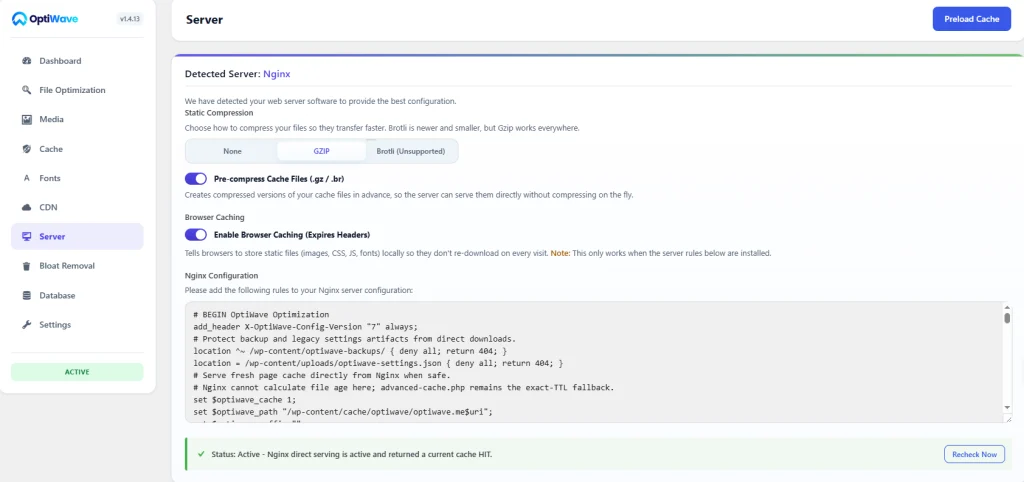
A superior engineering approach is pre-compression at write time. When a page is cached, OptiWave generates three variants on disk simultaneously: the raw index.html, a maximum-compression Gzip file (index.html.gz, level 9), and a Brotli file (index.html.br, level 11). When a modern browser sends Accept-Encoding: br, the web server serves the pre-compressed Brotli file straight from disk. The file payload is 15% to 25% smaller than Gzip, and the server CPU stays cold. It saves bandwidth and eliminates runtime latency in one stroke.
7. Optimizing Origin Processing for Uncached Dynamic Requests
Zero-PHP caching delivers 1ms TTFB for static page visitors. But what about dynamic requests that cannot be cached, such as logged-in users, WooCommerce checkouts, or search queries? For these paths, your origin processing speed determines your TTFB.
To keep uncached TTFB under 200ms:
- Install an In-Memory Object Cache (Redis or Memcached): By storing transient database query results in server RAM, WordPress avoids repeated SQL queries for metadata and options on every dynamic page load.
- Clean Autoloaded Database Records: Inspect your
wp_optionstable. Autoloaded options should never exceed 800KB. Delete orphan transients and configuration records left behind by uninstalled plugins. - Optimize PHP-FPM Process Manager: Switch from
pm = ondemandtopm = dynamicorpm = staticin yourwww.conffile. This keeps worker processes alive in memory rather than spawning and killing them on every connection. - Upgrade to PHP 8.2 or 8.3: Each major PHP release brings substantial JIT compiler optimizations and memory efficiency improvements, reducing core execution time by 15% to 30% compared to PHP 7.4.
8. Edge Caching and Cloudflare Post-Purge Cache Stale Loops
When you distribute your HTML through a global content delivery network (CDN) like Cloudflare, TTFB drops from 100ms origin latency to under 30ms worldwide because responses are served from a data center physically close to the visitor.
However, standard Cloudflare setups suffer from a dangerous architectural pitfall: the post-purge edge cache stale loop. When you update an article in WordPress and issue a cache purge, the next visitor triggers an origin fetch. If Cloudflare caches that initial response without strict revalidation headers, it can lock stale HTML at the edge for up to 30 days, serving old content despite your purge.
OptiWave solves this at the protocol level by automatically injecting Cloudflare-CDN-Cache-Control: no-store on the very first response following a purge event. This forces edge nodes to fetch the freshly compiled static HTML immediately before re-establishing long-term edge caching rules. It eliminates stale cache locks permanently.
9. How to Reduce Initial Server Response Time in WordPress with OptiWave
Manual server rule editing is dangerous. A single misplaced bracket or missing rewrite flag in .htaccess or Nginx configuration will instantly crash your site with a 500 Internal Server Error. That’s why we built OptiWave: to automate bare-metal server acceleration with complete fail-safe engineering.
Instead of stacking multiple fragile plugins for page caching, pre-compression, and database cleanup, OptiWave combines everything into a single, unified performance engine under 500KB:
- Automated Layer 1 Zero-PHP Rewrites: Detects your server environment (Apache, Nginx, or LiteSpeed) and generates native rewrite rules automatically with instant 1-click toggles.
- Pristine Backup Safety: Before modifying a single character in your
.htaccess, OptiWave takes a pristine timestamped snapshot (.htaccess.original.bak). If anything goes wrong, your original server rules are restored instantly. - Pre-Compression Engine: Automatically writes Gzip level 9 and Brotli level 11 static files on disk at cache write time.
- Adaptive Cache Preloader: Scans your XML sitemaps and preloads pages into cache dynamically, throttling requests based on real-time server CPU load so your hosting never throws 503 errors.
- E-Commerce Protection: Automatically protects WooCommerce checkout, cart sessions, and customer accounts from being cached or preloaded.
And if you’re managing media-heavy sites, pair this with our WordPress image optimization guide to ensure your LCP assets load just as fast as your HTML document. If you’re ready to stop guessing and reduce your server response time down to 1 millisecond, explore the OptiWave performance plans today.
What is a good TTFB score according to Google?
Google defines a good Time to First Byte (TTFB) as 800 milliseconds or less at the 75th percentile of user visits. In high-performance engineering, our target for cached WordPress pages is under 50 milliseconds from the edge and under 150 milliseconds from the origin server.
Why do traditional caching plugins still have 50ms to 80ms TTFB?
Most WordPress caching plugins rely on Layer 2 advanced-cache.php drop-ins. While faster than querying MySQL, this architecture still forces PHP to boot, parse configuration files, and allocate server memory on every single visit. Only Layer 1 server rewrite rules bypass PHP completely to serve raw static HTML in 1ms.
Will zero-PHP server caching break WooCommerce shopping carts?
No, provided your rewrite rules declare dynamic cookie and URL exclusions. OptiWave automatically injects bypass conditions for cart, checkout, customer accounts, and active session cookies so e-commerce stores deliver 1ms catalog browsing while keeping checkout transactions 100% dynamic and secure.
How much of Largest Contentful Paint (LCP) depends on TTFB?
TTFB forms the absolute foundation of your Largest Contentful Paint. In real-world browser waterfalls, TTFB accounts for 40% or more of total LCP duration. If your initial server response takes 1.5 seconds, your browser cannot even discover your hero image or critical stylesheet until that time has elapsed.