

This guide is part of our in-depth performance engineering series on WordPress speed optimization. For the complete high-level architecture, explore our foundational 3-step framework.
You test your WordPress blog on Google PageSpeed Insights. A frustrating red diagnostic jumps out: “Reduce unused CSS”. You open the details and discover that over 85% of your theme stylesheet is never even touched by the page. You’re forcing mobile visitors to download 300 kilobytes of dead styling rules for widgets, forms, and footers that don’t exist on the URL. That’s pure bloat. And it stalls browser rendering. Users get bored and leave. We can do much better.
To remove unused CSS WordPress websites must isolate above-the-fold viewport rules through headless cloud extraction while preserving dynamic classes and loading secondary stylesheets asynchronously. Because WordPress themes and multi-purpose plugins package hundreds of kilobytes of styling for widgets and templates that never appear on individual posts, visitors download massive amounts of dead code. This bloated payload wastes cellular bandwidth, halts CSS Object Model construction, and triggers severe PageSpeed Insights warnings. Safely eliminating unused code requires a balanced architecture: generating precise Critical CSS with dynamic class safelists for mobile menus and modals, conditionally dequeuing plugin stylesheets on pages where their components are absent, and stripping obsolete WordPress core scripts like legacy emojis and frontend Dashicons. When you purge unused styling and background bloat, your pages render instantly on the initial network packet, eliminating First Contentful Paint delays and passing Google Core Web Vitals.
Having studied systems information at university, I’ve spent over a decade analyzing compiler AST trees, CSS parsers, and browser rendering engines. Across more than 3,000 custom web platforms, high-concurrency Node.js event loops, Laravel enterprise APIs, and WordPress builds engineered at our development company since 2015, code bloat is an inevitable byproduct of CMS modularity. Developers build plugins to serve every possible feature, but your visitors only need a small slice of that code. Let’s look at how to purge dead styling safely. We’ll clean your WordPress code without breaking a single button.
Table of Contents
1. Why WordPress Accumulates Massive CSS and Code Bloat
WordPress themes and plugins are engineered to be versatile. A multi-purpose theme has to support homepages, portfolio grids, WooCommerce shops, contact forms, and custom footers. To achieve this flexibility, developers pack every layout style into a single monolithic file like style.css. That’s convenient for the developer. But it’s devastating for the user.
When a visitor loads a straightforward article, the browser must download and parse thousands of selectors for pricing tables, modal dialogs, and shopping carts that aren’t on the screen. Because the browser cannot build the CSSOM until the entire stylesheet is parsed, this dead code acts as a direct roadblock. It delays First Contentful Paint and drives down your Largest Contentful Paint (LCP) score. It adds up fast.
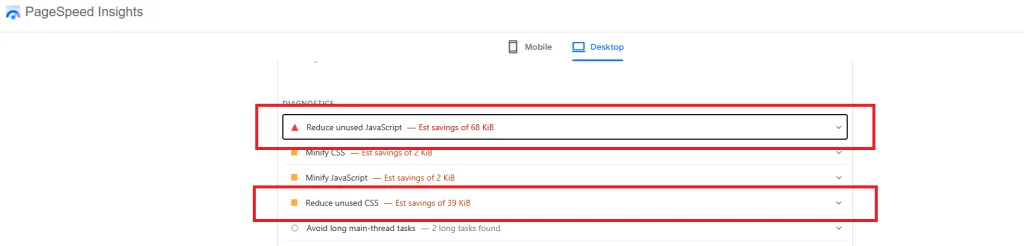
Even worse, many third-party plugins enqueue their assets globally across your entire site. A contact form plugin will inject its CSS stylesheet on your homepage even though the form only lives on /contact/. A slider plugin enqueues 60KB of CSS on blog posts that don’t have a single slider. That’s why cleaning code requires intentional filtering. No exceptions.
2. The Dangers of Basic RUCSS Plugins (FOUC and Broken Interactive States)
In an attempt to pass the “Reduce unused CSS” audit, many site owners install basic optimization plugins that feature aggressive “Remove Unused CSS” toggles. These rudimentary tools scrape the raw HTML output on the server and delete any CSS rule whose selector doesn’t match an element in the static HTML markup. And that’s where disasters begin.
Modern web applications rely on dynamic state classes added via JavaScript during user interaction. Here is what happens when basic RUCSS purges those rules:
- Broken Mobile Navigation Menus: When a user taps the hamburger menu, JavaScript appends a class like
.menu-is-active. But because that class wasn’t in the initial HTML, the plugin deleted its CSS. The menu stays invisible. Users can’t navigate. - Flash of Unstyled Content (FOUC): Pages load with unstyled typography, misaligned buttons, or oversized logos before secondary styles arrive, causing severe visual reflows (see our guide to fix Cumulative Layout Shift in WordPress).
- Corrupted CSS Syntax: Primitive regex string replacement tools often strip braces or unbalance media queries, corrupting the entire stylesheet and breaking page layouts.
Never rely on primitive regex parsers for code purging. If you strip styles without safelisting dynamic states, you’ll break your site for real visitors while chasing a lab score. That’s a bad trade-off. Precision engineering is the only way.
How Do You Remove Unused CSS in WordPress?
To remove unused CSS in WordPress without breaking page layout or interactive components, you must isolate viewport styles and deliver non-critical stylesheets asynchronously. Basic cleanup tools that rely on primitive regex parsers often strip dynamic CSS classes required for mobile menus and modals. You can safely remove unused CSS in 4 steps:
- 1. Extract Cloud Critical CSS: Inline above-the-fold Critical CSS directly in the HTML head to satisfy First Contentful Paint.
- 2. Safelist Dynamic Classes: Protect interactive element selectors (such as mobile menus, accordions, and WooCommerce notices) from being purged.
- 3. Dequeue Unused Plugin Styles: Use
wp_dequeue_styleto conditionally stop plugin stylesheets on pages where their elements do not exist. - 4. Enable Separate Block Assets: Filter
should_load_separate_core_block_assetsso Gutenberg enqueues CSS only for blocks active on the URL.
Combining Critical CSS generation with conditional dequeuing eliminates render-blocking warnings in Google PageSpeed Insights while keeping layout stability perfectly intact.
3. Fix 1: Cloud-Rendered Critical CSS with Dynamic Class Safelisting
The safe, architectural way to solve unused CSS is combining cloud-rendered Critical CSS with dynamic class safelisting. Instead of deleting rules permanently, this method splits CSS into two complementary tiers:
- Tier 1: Inlined Critical Path: A headless Chromium browser renders the page at exact desktop (1300px) and mobile (375px) viewports in the cloud. It identifies the exact CSS rules needed to paint above-the-fold content and inlines them directly into the HTML head.
- Tier 2: Asynchronous Secondary Delivery: The full original stylesheet loads in the background via the non-blocking media swap pattern (
media="print" onload="this.media='all'"). All interactive classes remain 100% intact.
To guarantee that interactive elements look perfect the instant they open, you add explicit safelist patterns to your Critical CSS generator:
/* Dynamic Class Safelist Rules */
.mobile-nav-active,
.site-navigation.is-open,
.modal-visible,
.woocommerce-error,
.woocommerce-message,
.drawer-open {
  /* Critical interactive states preserved during extraction */
}
By preserving these critical interactive states in your inlined style block, mobile menus open instantly with zero layout shifts and zero styling delays. And the browser paints your hero section within 250 milliseconds. For full details on managing asset pipelines, explore our guide on how to eliminate render-blocking resources in WordPress.
4. Fix 2: Selectively Dequeuing Plugin Styles with wp_dequeue_style
The cleanest CSS rule is the one that never loads in the first place. If a plugin injects a 50KB stylesheet onto pages where it’s never used, you should dequeue it at the WordPress theme level. WordPress provides the wp_dequeue_style and wp_deregister_style hooks for this exact purpose.
For example, if your contact form plugin enqueues its assets globally, you can restrict it to load exclusively on your contact template:
// Conditionally Dequeue Unused Plugin Stylesheets
add_action('wp_enqueue_scripts', function() {
    // Remove Contact Form 7 styles on all non-contact pages
    if (!is_page('contact')) {
        wp_dequeue_style('contact-form-7');
        wp_dequeue_script('contact-form-7');
    }

    // Remove WooCommerce styles on informational blog posts
    if (is_singular('post')) {
        wp_dequeue_style('woocommerce-general');
        wp_dequeue_style('woocommerce-layout');
        wp_dequeue_style('woocommerce-smallscreen');
    }
}, 99);
Notice the priority argument set to 99. Plugins typically enqueue their styles with default priorities between 10 and 20. Running your dequeue function at priority 99 ensures that the plugin has already registered its handle, allowing you to intercept and remove it cleanly. This strips dozens of unnecessary HTTP requests from your blog posts.
5. Fix 3: 11 Surgical WordPress Core Bloat Removals
By default, WordPress Core enqueues numerous legacy scripts, stylesheets, and meta tags into every single page for backward compatibility with technologies from over a decade ago. Stripping these unused assets cleans your HTML document head and reduces DOM parsing overhead:
| Bloat Component | Default Core Behavior | Performance Advantage When Removed |
|---|---|---|
| Emoji Scripts | Loads inline JS and CSS (~20KB) on every page | Native OS emojis render automatically with zero code |
| oEmbed JS | wp-embed.min.js injected into all pages | Saves an external script request and DOM parsing time |
| XML-RPC Endpoint | Active endpoint targeted by brute-force bots | Eliminates security vulnerability and server CPU spikes |
| Dashicons CSS | 35KB admin icon font loaded for visitors | Saves 35KB of blocking CSS for non-logged-in users |
| Heartbeat API | Polls server via AJAX every 15 seconds | Throttled to 60s, saving backend PHP and database load |
| Post Revisions | Saves unlimited revisions in database | Capped at 3, keeping SQL tables lean and indexed |
| RSD Head Link | EditURI discovery link in head | Removes obsolete XML-RPC head tag |
| WLW Manifest | Windows Live Writer manifest link in head | Removes ancient dead blog client link |
| WP Generator | Meta tag exposing exact WordPress version | Removes version footprint and enhances security |
| Shortlink Tag | rel=”shortlink” link in head | Eliminates redundant canonical head clutter |
| Self-Pingbacks | Sends trackbacks when linking internal posts | Prevents internal pingback spam and database clutter |
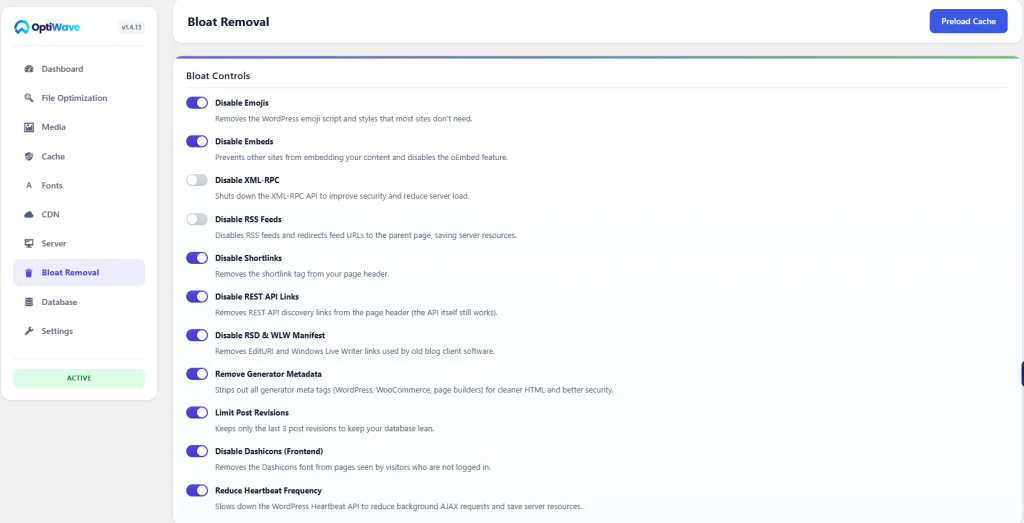
Individually, each bloat toggle saves between 5KB and 35KB. But when combined across all eleven components, you eliminate over 100KB of blocking scripts and unused CSS from every pageview. That’s an instant speed boost for mobile users.
6. Fix 4: Cleaning Gutenberg Block CSS and Modular Style Enqueuing
Starting with WordPress 5.8, Core introduced modular block stylesheet loading via the should_load_separate_core_block_assets filter. By default in older themes, WordPress enqueues one massive 80KB block-library/style.min.css file containing styling for every core block (tables, audio players, cover blocks, galleries) whether your post uses them or not.
Activating separate block assets ensures that WordPress only enqueues CSS for blocks that actually appear in your post content:
// Enqueue only CSS for blocks present on the current page
add_filter('should_load_separate_core_block_assets', '__return_true');
If a post only contains headings, paragraphs, and images, WordPress loads only those three tiny block styles (under 4KB total) instead of the entire 80KB library. That cuts your block CSS payload by over 90%. Combine this with next-gen image formats from our WordPress image optimization guide for maximum frontend speed.
7. Fix 5: Database Maintenance: Transients, Revisions, and Table Hygiene
Clean code extends beyond stylesheets and scripts. An un-maintained MySQL database slows down backend query execution and directly inflates your Time to First Byte (TTFB). Over time, WordPress databases accumulate thousands of orphaned rows:
- Expired Transients: Temporary cache entries stored in
wp_optionsthat never get purged automatically, bloating autoloaded option sizes. - Orphaned Post Revisions: Storing dozens of revisions for every draft swells the
wp_postsandwp_postmetatables into hundreds of thousands of unnecessary rows. - Spam and Trashed Comments: Unapproved comments left in
wp_commentsdegrade index efficiency. - Table Fragmentation: Frequent row insertions and deletions fragment MySQL B-trees, requiring regular
OPTIMIZE TABLEmaintenance.
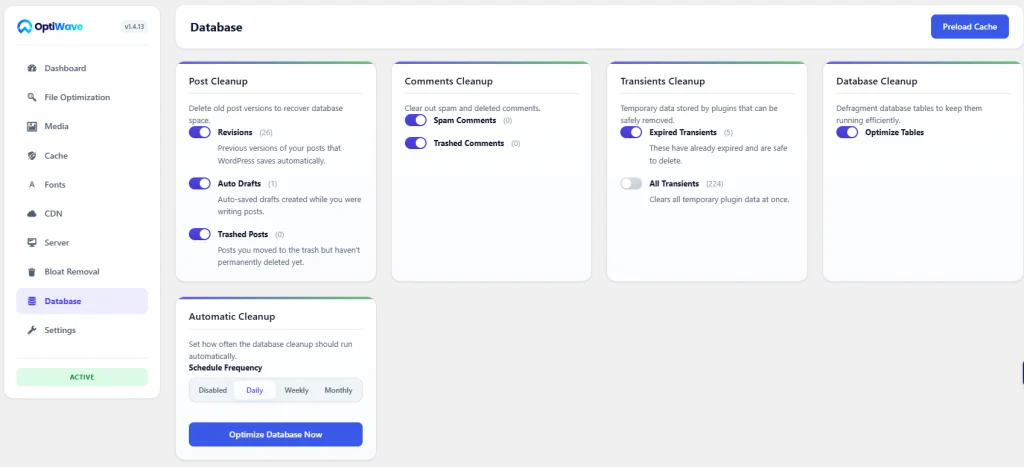
Routinely purging transients and defragmenting database tables keeps SQL lookups blazing fast. If your server response time is lagging behind, read our comprehensive guide on how to reduce initial server response time in WordPress.
8. Fix 6: Instant 0ms Page Navigation with the Speculation Rules API
Once your assets are lean, you can supercharge perceived speed using the modern Speculation Rules API. Historically, sites loaded heavy JavaScript libraries (such as InstantPage.js) to prefetch links when a user hovered over them. But those scripts consumed CPU cycles and main-thread memory.
The Speculation Rules API is a native browser standard. By injecting a lightweight JSON script block, you tell Chromium to prefetch or prerender internal URLs natively:
<!-- Native Browser Link Prefetching with Zero JS Overhead -->
<script type="speculationrules">
{
  "prefetch": [
    {
      "source": "document",
      "where": {
        "and": [
          { "href_matches": "/*" },
          { "not": { "href_matches": "/wp-admin/*" } },
          { "not": { "href_matches": "/cart/*" } },
          { "not": { "href_matches": "/checkout/*" } }
        ]
      },
      "eagerness": "moderate"
    }
  ]
}
</script>
When a user hovers over an article link for just 200 milliseconds, the browser downloads the page in the background. When they click, the page transitions with zero latency. It feels like an instant native mobile app. And it requires zero JavaScript runtime libraries. That’s modern web architecture.
9. Profiling CSS Coverage and Unused Rules in Chrome DevTools
To measure exact CSS efficiency, use the Chrome DevTools Coverage tab. Open DevTools, press Ctrl+Shift+P (or Cmd+Shift+P on Mac), type “Coverage”, and select “Show Coverage”. Click the reload button to record asset execution.
DevTools displays every CSS and JavaScript file with a visual percentage breakdown. The blue portion represents code executed by the current page. The red portion highlights unused bytes. Clicking on any file displays the exact selector lines in red that never matched an active DOM node. This profiling data gives you immediate clarity on which plugins are overloading your pages. If script execution is holding back user taps, check our guide on how to fix Interaction to Next Paint in WordPress.
10. How OptiWave Automates Zero-Bloat Code Elimination on WordPress
Manually dequeuing plugin styles, maintaining Critical CSS safelists, and running SQL maintenance commands across hundreds of posts is tedious and error-prone. One theme update can overwrite your functions and re-introduce bloat. You don’t have time to baby-sit code.
OptiWave delivers complete automated code and bloat elimination in one unified plugin suite:
- Automated Cloud Critical CSS: Inlines viewport-perfect styling extracted in the cloud and defers secondary stylesheets with automatic brace validation.
- 11 Surgical Bloat Cleaner Toggles: Disable emojis, oEmbeds, XML-RPC, Dashicons, and generator tags with individual 1-click controls.
- Automated Database Hygiene: Schedule weekly cleanup of expired transients, orphan revisions, and run database table defragmentation.
- Native Speculation Rules Engine: Injects modern browser prefetching rules without loading heavy third-party JavaScript prefetchers.
- Full Core Web Vitals Suite: Combine clean code with our guides on how to reduce initial server response time and how to eliminate render-blocking resources.
What happens when you remove unused CSS in WordPress?
Removing unused CSS eliminates stylesheets and selector rules that are not applied to elements on the active page. This dramatically cuts page transfer weight, clears render-blocking CSS warnings in Google PageSpeed Insights, accelerates First Contentful Paint (FCP), and reduces main-thread browser processing overhead during DOM construction.
Why does removing unused CSS sometimes break my site?
Basic RUCSS (Remove Unused CSS) plugins scrape HTML before user interaction. When CSS rules for interactive elements (such as mobile hamburger menus, popup modals, accordions, WooCommerce checkout notices, or cart sidebars) are stripped because they are hidden at initial load, these components lose their styling and functionality when triggered. OptiWave avoids this breakage using dynamic class safelisting to preserve all interactive states.
What is the Speculation Rules API?
The Speculation Rules API is a modern browser web standard that allows pages to define JSON rules for prefetching or pre-rendering candidate URLs before the visitor clicks. Unlike legacy JavaScript prefetch libraries (such as InstantPage.js or Quicklink) that consume CPU cycles and main-thread memory, the Speculation Rules API operates natively inside the browser engine, delivering instant, zero-millisecond navigation transitions.
Does cleaning post revisions improve site speed?
Yes, indirectly. WordPress saves a new revision every time you draft or update a post, easily bloating the wp_posts and wp_postmeta tables into hundreds of thousands of rows. Cleaning orphaned revisions and capping future revisions (e.g. to 3 or 5) prevents database index bloat, accelerates SQL query execution times, and reduces Time to First Byte (TTFB) on high-traffic sites.
Can I remove unused CSS without using a plugin?
You can selectively dequeue unused plugin stylesheets using the WordPress wp_dequeue_style hook inside your functions.php file based on conditional tags like is_front_page or is_single. However, extracting Critical CSS and purging unused rules across thousands of dynamic template combinations requires automated cloud headless rendering to prevent layout breakages.